
Go × Gin Basics: A Thorough Guide to Building a High-Speed API Server

This post is also available in 日本語.
Introduction
The Go language boasts simplicity and high-speed processing capabilities, making it a very reliable choice for web service and API development. Gin, a lightweight and high-performance web framework, allows you to maximize these strengths of Go.
This article provides a step-by-step explanation of the appeal and basic usage of Go × Gin, designed to be easy for beginners to follow. We will proceed with concrete, ready-to-try examples, covering everything from installation and creating a "Hello World" to the basics of requests/responses and utilizing middleware.
We hope this article serves as a useful guide for anyone who wants to "build a fast and simple API server." Now, let's dive into the world of Gin together.
Why Choose Go + Gin
When building web applications or API servers, the choice of language and framework is crucial. Here, we'll outline the reasons for choosing Go and Gin.
1️⃣ The Appeal of Go
- High performance: Go is a compiled language, enabling lightweight and fast execution.
- Simple syntax: You can write robust code with minimal notation, which lowers the learning curve.
- Strong in concurrent processing: Utilizing Goroutines and Channels makes it easy to achieve scalable processing.
2️⃣ Strengths of Gin
- Incredible speed: Gin is known as an "extremely fast web framework."
- Rich features: It covers all the necessary features for an API server, including routing, middleware, and JSON handling.
- Simple API design: Its straightforward API allows you to start practical development right away.
3️⃣ The Great Compatibility of Go × Gin
The simplicity of Go and the speed and functionality of Gin are highly compatible, supporting the construction of API servers that balance both performance and maintainability.
In this article, we will leverage this powerful combination and carefully explain the process of actually building an API server. Next, we'll start by getting Gin up and running.
Gin Installation and Initial Setup
Here, we will proceed with installing Gin into a project and getting a minimal server running.
Check Go Version
First, check your Go version. Gin recommends Go 1.18 or later, so confirm your current Go version with the following command.
go version
Example:
go version go1.23.0 darwin/arm64
Create a Project Directory
Create a new directory for your project. As an example, we'll create a directory named my-gin-app.
mkdir go-gin-basic-guide
cd go-gin-basic-guide
Initialize Go Modules
If you haven't initialized Go modules yet, run the following command.
go mod init go-gin-basic-guide
Install Gin
Install Gin.
go get -u github.com/gin-gonic/gin
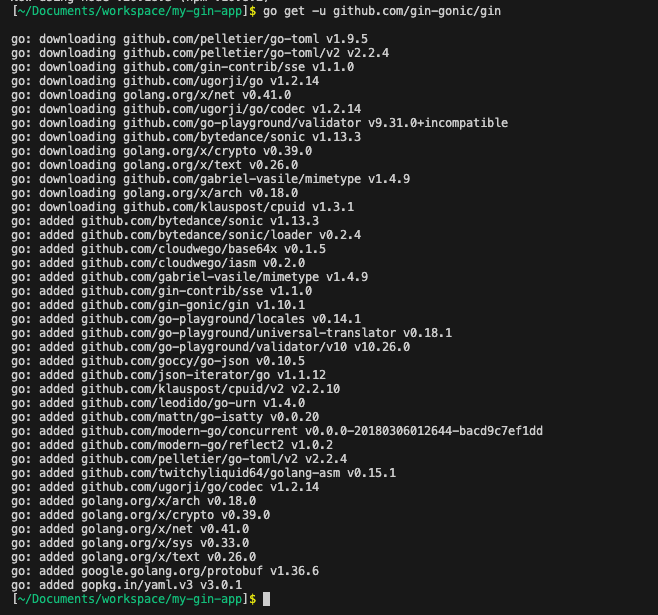
Create a Minimal Server
Create a main.go file and write the following content.
package main

import (
	"github.com/gin-gonic/gin"
)

func main() {
	r := gin.Default()
	r.GET("/ping", func(c *gin.Context) {
		c.JSON(200, gin.H{
			"message": "pong",
		})
	})
	r.Run() // listens on :8080 by default
}
Start the Server
Start the server with the following command.
go run main.go
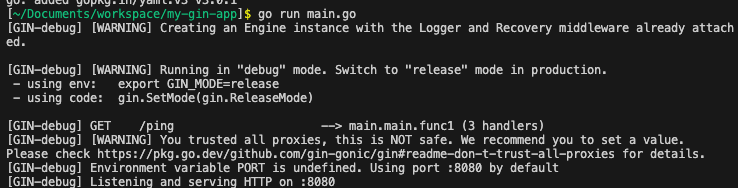
Access http://localhost:8080/ping with a browser or curl and confirm that a JSON response is displayed.
curl http://localhost:8080/ping

With this, the basic setup for running Gin is complete. Next, we'll delve a little deeper into Gin's basic structure.
Supplement: Achieving Hot Reload with Air
Manually running go run every time you change the code during development is tedious. Therefore, we'll introduce air to enable hot reloading.
Install air with the following command.
go install github.com/air-verse/air@latest
air can use a configuration file named .air.toml. Create it in the project root with the following content.
# .air.toml
root = "."
tmp_dir = "tmp"

[build]
  cmd = "go build -o ./tmp/main ."
  bin = "tmp/main"
  include_ext = ["go"]
  exclude_dir = ["tmp", "vendor"]

[log]
  time = true
| Item | Meaning |
|---|---|
root |
Root directory to watch |
tmp_dir |
Location for build artifacts |
[build] |
Build and execution settings |
cmd |
Build command (here, it builds the Go binary to tmp/main) |
bin |
Path to the binary file to execute |
include_ext |
File extensions to watch |
exclude_dir |
Directories to exclude from watching |
When you run the following command, air will watch for source code changes and restart the server immediately.
air
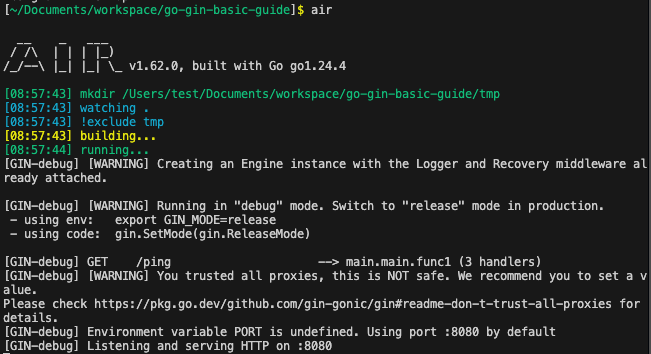
As a test, let's change the URL path from /ping to /pong.
func main() {
	r := gin.Default()
-	r.GET("/ping", func(c *gin.Context) {
+	r.GET("/pong", func(c *gin.Context) {
		c.JSON(200, gin.H{
			"message": "pong",
		})
	})
	r.Run() // listens on :8080 by default
}
You can then confirm that a response is returned from /pong.
curl http://localhost:8080/pong
Once you've confirmed it works, remember to change it back.
Understanding Gin's Basic Structure
A Gin application is primarily composed of a router, handlers, and a context. Here, we will detail the role and mechanism of each, and include examples that you can test by modifying requests.
Router
The entry point of a Gin application is the router. Using gin.Default() allows you to easily initialize a router that comes pre-configured with logger and recovery middleware.
r := gin.Default()
Handler
A handler function corresponds to an endpoint registered with the router. It's the process that receives an HTTP request and returns a response.
For example, the following code returns a JSON response "pong" when the /ping path is accessed.
r.GET("/ping", func(c *gin.Context) {
    c.JSON(200, gin.H{"message": "pong"})
})
Here, /ping corresponds to the path part of the URL. You can verify its operation by accessing http://localhost:8080/ping via browser or curl.
Context
*gin.Context is a convenient struct for handling information related to requests and responses.
For example, you can get query parameters as follows:
func main() {
	r := gin.Default()
	r.GET("/ping", func(c *gin.Context) {
		c.JSON(200, gin.H{
			"message": "pong",
		})
	})
+	r.GET("/hello", func(c *gin.Context) {
+		name := c.Query("name") // Get with ?name=value
+		c.JSON(200, gin.H{"message": "Hello, " + name})
+	})
	r.Run() // listens on :8080 by default
}
curl 'http://localhost:8080/hello?name=Gopher'
The response will be as follows:
{"message": "Hello, Gopher"}
You can confirm that the response changes if you change the query parameter and make another request.
Grouping
As the number of endpoints grows, you'll want to manage common paths together. Gin's grouping feature allows you to group common parts of paths.
In the following example, we group the common path /api and define GET /api/users and POST /api/users within it.
func main() {
	r := gin.Default()
	r.GET("/ping", func(c *gin.Context) {
		c.JSON(200, gin.H{
			"message": "pong",
		})
	})
	r.GET("/hello", func(c *gin.Context) {
		name := c.Query("name") // Get with ?name=value
		c.JSON(200, gin.H{"message": "Hello, " + name})
	})
+	api := r.Group("/api")
+	{
+		api.GET("/users", func(c *gin.Context) {
+			c.JSON(200, gin.H{"message": "GET /api/users"})
+		})
+
+		api.POST("/users", func(c *gin.Context) {
+			c.JSON(200, gin.H{"message": "POST /api/users"})
+		})
+	}
	r.Run() // listens on :8080 by default
}
By accessing the following URLs, you can confirm that each endpoint is working correctly.
curl http://localhost:8080/api/users
curl -X POST http://localhost:8080/api/users
Basics of Request Handling
Here, we will cover the basics of handling requests using Gin.
We'll look at how to actually retrieve parameters and return responses while verifying their operation.
Getting Path Parameters
To get a value embedded in the path, define the route using the :param format.
+ r.GET("/users/:id", func(c *gin.Context) {
+     id := c.Param("id")
+     c.JSON(200, gin.H{"user_id": id})
+ })
Access the following URL:
curl http://localhost:8080/users/123
Response:
{"user_id": "123"}
Getting Query Parameters
To get query parameters (in the ?key=value format), use c.Query.
+ r.GET("/search", func(c *gin.Context) {
+     keyword := c.Query("q")
+     c.JSON(200, gin.H{"query": keyword})
+ })
Access the following URL:
curl 'http://localhost:8080/search?q=Gin'
Response:
{"query": "Gin"}
You can confirm that the response changes dynamically when you change the query parameter.
Getting Form Parameters (POST)
Data sent from a form is retrieved with c.PostForm.
+ r.POST("/submit", func(c *gin.Context) {
+     name := c.PostForm("name")
+     c.JSON(200, gin.H{"submitted_name": name})
+ })
Send a POST request with curl:
curl -X POST -d "name=Gopher" http://localhost:8080/submit
Response:
{"submitted_name": "Gopher"}
Getting JSON Requests
When data is sent from the client in JSON format, bind it to a struct using c.BindJSON.
+ type User struct {
+     Name string `json:"name"`
+     Age  int    `json:"age"`
+ }

func main() {
	r := gin.Default()

// ...omitted for brevity...

+ r.POST("/json", func(c *gin.Context) {
+		var user User
+		if err := c.BindJSON(&user); err != nil {
+			c.JSON(400, gin.H{"error": err.Error()})
+			return
+		}
+		c.JSON(200, gin.H{"name": user.Name, "age": user.Age})
+	})
	r.Run() // listens on :8080 by default
}
Send JSON with curl:
curl -X POST -H "Content-Type: application/json" -d '{"name":"Gopher","age":5}' http://localhost:8080/json
Response:
{"name": "Gopher", "age": 5}
Summary
We've covered the following key points for the basics of request handling:
✅ Path parameters: c.Param
✅ Query parameters: c.Query
✅ Form parameters: c.PostForm
✅ JSON requests: c.BindJSON
By combining these, you can flexibly handle various API requests.
Next, we'll look at how to write responses.
Writing Responses
Here, we will cover how to write responses using Gin.
We will clarify the most important aspect of an API server: "what to return to the client."
JSON Response
It is common for APIs to return responses in JSON format. You can return them using c.JSON as follows:
r.GET("/json", func(c *gin.Context) {
    c.JSON(200, gin.H{
        "message": "Hello, Gin!",
    })
})
- 1st argument: HTTP status code (e.g., 200)
- 2nd argument: JSON data to return (
map[string]interface{}or a struct)
String Response
To return text directly, use c.String.
r.GET("/text", func(c *gin.Context) {
    c.String(200, "This is a plain text response.")
})
This is useful for returning simple messages.
HTML Response
Use c.HTML when returning HTML.
Here is an example that loads a template with LoadHTMLGlob and returns HTML.
+ r.LoadHTMLGlob("templates/*")
+ r.GET("/html", func(c *gin.Context) {
+     c.HTML(200, "index.tmpl", gin.H{"title": "Hello, HTML!"})
+ })
Use a directory structure like the following:
my-gin-app/
├── main.go
└── templates/
    └── index.tmpl
Sample templates/index.tmpl:
<!DOCTYPE html>
<html>
<head>
  <title>{{ .title }}</title>
</head>
<body>
  <h1>{{ .title }}</h1>
  <p>This is a sample HTML response rendered by Gin.</p>
</body>
</html>
The heading "Hello, HTML!" and the body text will be displayed in the browser.
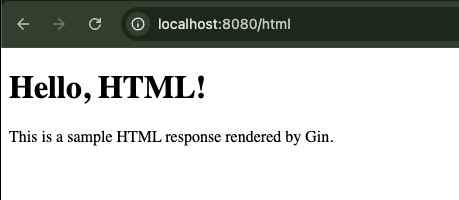
Summary
We've covered the following key points for writing responses with Gin:
✅ JSON: c.JSON
✅ String: c.String
✅ HTML: c.HTML
✅ Status code only: c.Status
✅ Unified error response: Define and return a struct
By using these appropriately, API design and operation become smoother.
Next, we'll look at how to utilize Gin's middleware.
Utilizing Middleware
In Gin, you can use middleware to insert common processing before and after a request.
Here, we will cover how to introduce standard built-in middleware and custom middleware.
Built-in Middleware
Gin has several useful built-in middleware. Here are some of the main ones.
Logger
This middleware logs requests.
r := gin.New()
r.Use(gin.Logger())
Since gin.Default() already includes the logger, you don't need to add it again.
When you access the API, logs will be displayed in the console.

Recovery
This middleware prevents the server from crashing even if a panic occurs, and instead returns a 500 error response.
r.Use(gin.Recovery())
This is also included in gin.Default().
How to Create Custom Middleware
If you want to perform common pre-processing or post-processing, you can create your own middleware.
The following is a simple example that displays "Before request..." each time a request comes in.
+ func MyCustomMiddleware() gin.HandlerFunc {
+ 	return func(c *gin.Context) {
+ 		println("Before request...")
+ 		c.Next()
+ 		println("After request...")
+ 	}
+ }

func main() {
	r := gin.Default()
+ 	r.Use(MyCustomMiddleware())
When you send a request to the API, you can confirm that "Before request..." and "After request..." are displayed.

Instead of applying it globally, you can also set middleware for specific routes only.
func main() {
	r := gin.Default()
- 	r.Use(MyCustomMiddleware())

// ...omitted for brevity...

+	r.GET("/special", MyCustomMiddleware(), func(c *gin.Context) {
+		c.JSON(200, gin.H{"message": "This route uses a custom middleware."})
+	})

	r.Run() // listens on :8080 by default
}
You can confirm that "Before request..." and "After request..." are displayed only for that specific route.

In Conclusion
So far, we have gone through the basics of developing a Go API server using Gin.
By writing and running the code, you should now have a good grasp of the following points:
✅ Gin's basic structure (router, handler, context)
✅ How to get various request parameters
✅ How to write JSON, text, and HTML responses
✅ How to utilize and manage middleware
These are all fundamental concepts in API development. The accumulation of small features leads to larger systems in the future.
To the Next Step
Based on the fundamental knowledge learned this time, we will move on to more practical applications next.
- Implementing authentication and validation
- Gin testing methods
- Key points for production deployment
- Concepts for scalable architecture, etc...
Questions about this article 📝
If you have any questions or feedback about the content, please feel free to contact us.
Go to inquiry formRelated Articles

A Journey of Trial and Error to Eliminate 'Occasionally Failing Tests' in Go Concurrency
2026/01/15
Article & Like API with Go + Gin + GORM (Part 1): First, an "implementation-first controller" with all-in-one CRUD
2025/07/13
Released a string slice utility for Go: “strlistutils”
2025/06/19
Complete Cache Strategy Guide: Maximizing Performance with CDN, Redis, and API Optimization
2024/03/07